This page covers the most commonly used Oracle OTM agent actions, with syntax examples and usage notes for each.
DIRECT SQL UPDATE
This action is used to execute a DML statement or call a PL/SQL procedure from within an agent.
Insert Statement — Example:
INSERT INTO order_release_refnum (order_release_gid,
ORDER_RELEASE_REFNUM_QUAL_GID,
ORDER_RELEASE_REFNUM_VALUE,
DOMAIN_NAME)
SELECT orr.order_release_gid,
'SO_NUM',
orlr.orl_refnum_value,
orlr.domain_name
FROM order_release orr,
order_release_line orl,
order_release_line_refnum orlr
WHERE orr.order_release_gid = orl.order_release_gid
AND orl.order_release_line_gid = orlr.order_release_line_gid
AND orlr.ORDER_RELEASE_REFNUM_QUAL_GID = 'SO_NUM'
AND ROWNUM = 1
AND NOT EXISTS
(SELECT 1
FROM order_release_refnum oref
WHERE oref.order_release_gid =
orr.order_release_gid
AND oref.order_release_refnum_qual_gid =
'SO_NUM')
AND orr.order_release_gid = $gid
Update Statement format:
UPDATE SHIP_UNIT SU
SET su.transport_handling_unit_gid = 'EXPORT'
WHERE EXISTS
(SELECT 1
FROM ORDER_RELEASE_LINE ORL, ship_unit_line sul
WHERE ORL.ORDER_RELEASE_GID = $GID
AND SUL.SHIP_UNIT_GID = SU.SHIP_UNIT_GID
AND sul.order_release_line_gid = orl.order_release_line_gid)
Stored Procedure Calls:
CALL xxotm_agent_pkg.update_ebs_fsu($gid)For an Oracle stored procedure to be accessible by an OTM agent, create a PUBLIC synonym for the procedure defined in the GLOGOWNER schema:
CREATE OR REPLACE PUBLIC SYNONYM xxotm_agent_pkg FOR glogowner.xxotm_agent_pkg;CALL glogowner.xxotm_agent_pkg.update_ebs_fsu($gid)Direct SQL Update Tips:
- When using statement type as stored procedure, ensure the Refresh Cache setting is not set to DML Returning (which is the default value).
- Always write a short description in the SQL Description field so the agent remains readable.
ASSIGN VARIABLE
This action declares a variable and associates a SQL query to populate it. For example, the following agent reads the planning status of an order release and sets the indicator color accordingly:
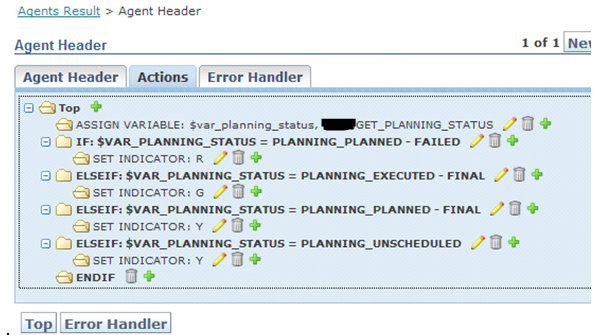
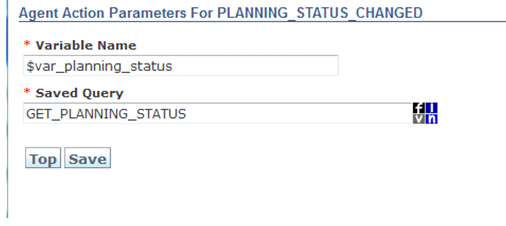
Query SQL:
SELECT NVL(STATUS_VALUE_XID,'X')
FROM ORDER_RELEASE_STATUS ORS, STATUS_VALUE SV, STATUS_TYPE ST
WHERE SV.STATUS_VALUE_GID = ORS.STATUS_VALUE_GID
AND ST.STATUS_TYPE_GID = ORS.STATUS_TYPE_GID
AND ST.STATUS_TYPE_XID = 'PLANNING'
AND ORS.ORDER_RELEASE_GID = $gidVariables declared in a parent agent can be accessed from a child agent.
Agent Variables:
Refer to the topic “Agent Variables” in OTM Help for built-in variables such as $gid.
$gidrefers to the current object ID on which the agent is triggered — for example, Order Release GID for an Order Release agent, or Shipment GID for a Shipment agent.$event_gid— if an agent listens to both ORDER - CREATED and ORDER - MODIFIED events and you need an action specific to ORDER - CREATED only, use$EVENT_GIDto distinguish between the two.
RAISE EVENT ACTION
This action triggers one agent from within another agent.
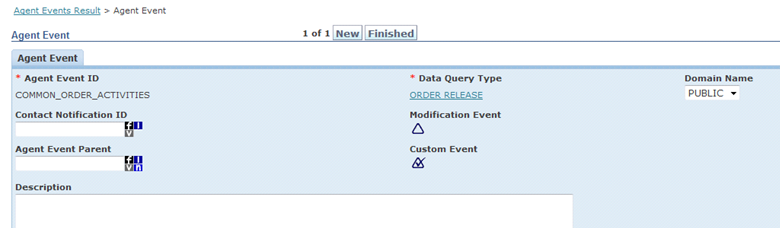
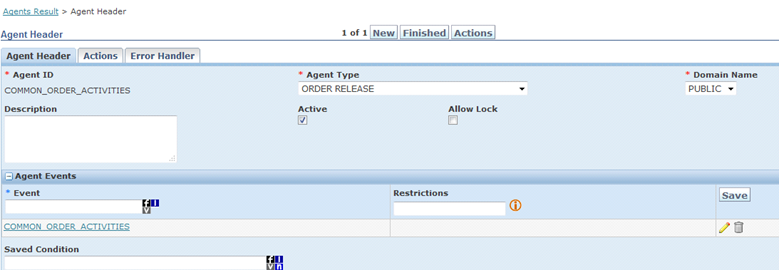
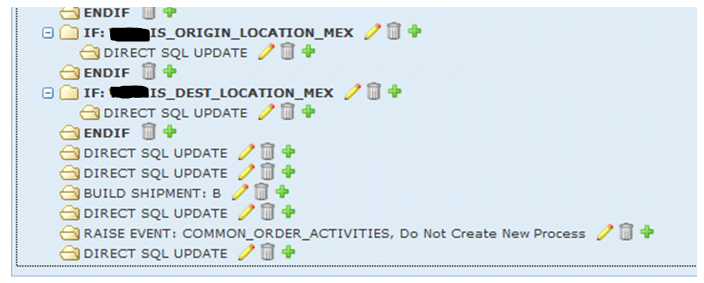
Example: If you have 5 agents triggered by ORDER - CREATED for different business process flows, and several common actions need to run for all 5, define a shared custom agent event and call it from each agent using RAISE EVENT.
Define a custom agent event:
Define an agent based on this custom event:
Call this agent from another agent using RAISE EVENT:
DATA TYPE ASSOCIATIONS
Example: Set Order Release Status to Executed when the corresponding Shipment reaches Accepted status. This requires updating the order release from within a shipment agent. Use Data Type Associations for cross-object updates.
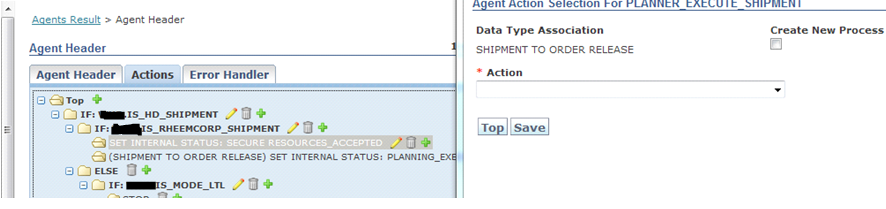
The screenshot above shows a Shipment agent action that updates the status on all corresponding order releases.
FOR EACH
This action repeats a custom event on a set of related objects from within any agent.
Example: From a shipment agent, identify specific order releases via a saved query and perform a custom action on each. Define a saved query to identify the target order releases, define a custom agent listening to a custom event with the desired actions, then call that event for each result using FOR EACH.
IF, ELSE, ELSEIF, END IF
These are conditional flow-control actions provided by OTM. IF and ELSEIF must be associated with saved conditions. The action evaluates to true or false based on whether the saved condition returns rows.
Complex Expression: In IF conditions, you can combine multiple individual conditions using logical AND or OR operators.
SCHEDULE EVENT
Usage: An alternative to WAIT logic when the wait duration is unknown.
Example: If an agent action should only run after a specific record exists in a table, but you do not know when that record will be available, a WAIT with a fixed duration will not work. Instead:
- Create an IF condition that checks whether the required record exists.
- If the record does not exist, use SCHEDULE EVENT to call the same agent again after 2 minutes (via a custom event).
- Add a STOP action inside the IF block so no further processing occurs in the current run.
- If the IF condition fails (record not found), the further processing logic after the IF block handles it.
BUILD SHIPMENT
Used in an ORDER RELEASE agent to plan the order and create a shipment. You must specify the perspective (e.g., B for Buy) and the parameter set value.
RELEASE ORDER BASE
Used in an ORDER BASE agent to release the instructions associated with that Order Base (PO) and create Order Release transactions.
LINK SHIPMENT TO ORDER BASE
From a Shipment agent, links related Order Bases to the shipment. Prerequisites:
- Corresponding Order Bases (POs) must already be released — Order Releases must exist.
- The Shipment Ship Unit Line qualifier CIN value must match the Order Base (PO Number).
SEND INTEGRATION
Used from any agent to send the object XML to an external system.
SET STATUS
Used in any agent to set internal status values for the current object.
STOP
Stops the agent workflow at that point, based on a condition. No further agent actions are executed after STOP is encountered.
NOTIFY CONTACT
Used in any agent to send a notification to a defined contact in the system (such as an email or message center notification).
AUTO MATCH INVOICE
On an Invoice agent, triggers the match rule defined for the carrier sending the invoice.
INVOICE - AUTO APPROVE / REJECT INVOICE
These Invoice agent actions are used to approve or reject a particular invoice transaction.
DIVERT SHIPMENT
Used on a Shipment agent to change the destination location on the shipment and re-rate it.
SET INDICATOR
Used in any agent to set an indicator status to Red, Green, White, or Yellow. Typically: Red for failure, Green for success, White for new/unprocessed, Yellow for warning.