Business Numbers:
OTM auto-generates IDs for business objects — shipments, order releases, invoices — using Business Number Rules. By default, shipments get a simple sequential number (e.g. 01001). A custom rule lets you embed the date, a prefix, or a domain-specific sequence into the generated ID, making it easier to identify records and align with your organisation’s numbering conventions.
The default shipment number looks like this:

To customise the shipment number format, edit the Business Number Rule for the TCRP domain:
You will see a default rule at the TCRP domain level for generating the XID. Edit this rule:
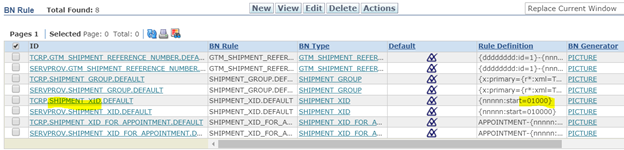
Build a new rule using a combination of static and dynamic expressions:
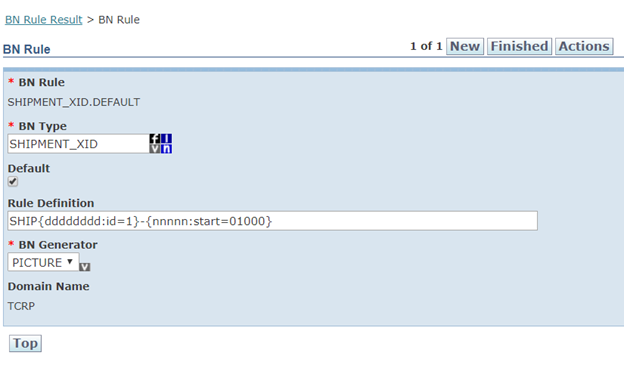
With this rule in place, planned shipments generate IDs in the format SHIP20200822-01000:

Planning Parameter:
A Planning Parameter Set controls the behaviour of OTM Bulk Plan — consolidation rules, time windows, cost optimisation settings, and more. Each domain should have its own parameter set so plan settings can be tuned independently.
Create a new parameter set for the TCRP domain:
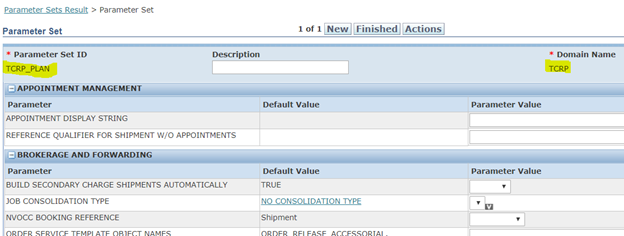
Set TCRP_PLAN as the default planning parameter for the TCRP domain so it is pre-selected each time a Bulk Plan is submitted: