Bulk Plan is OTM’s automated planning engine. It reads Order Release or Order Movements, matches them against the Itineraries and Rate Records configured in earlier posts, and creates optimised Shipments with carrier assignments and freight cost.
Create an Order Base:
An Order Base (Purchase Order) represents a buying commitment for a quantity of goods. Order Releases drawn from it represent shipments of specific quantities.
Enter the following details for the TCRP scenario:
Create two Order Releases:
Order Releases represent specific quantities being released for shipment against the Order Base. Create two releases for different quantities.
Create the first release:
Repeat the same path to create a second release:
Run Bulk Plan:
Query for the two Order Releases you just created:
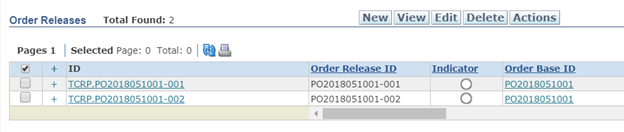
Select both Order Releases and run Bulk Plan:
OTM evaluates the available Itineraries and Rate Records and creates a single consolidated Shipment covering both Order Releases, assigning the least-cost carrier for the lane.
Shipment Routing Options:
To understand how OTM selects a route, use Shipment Routing Options before running Bulk Plan. This is useful when verifying your Rate and Itinerary configuration.
The rates configured for this scenario are:
Create a new Order Release with Source = DC and Destination = STORE_C, then request routing options:
OTM evaluates all matching Itineraries and presents two routing options — one direct (ITIN-B: DC → STORE_C) and one multi-leg (ITIN-D: DC → STORE_A → STORE_C):
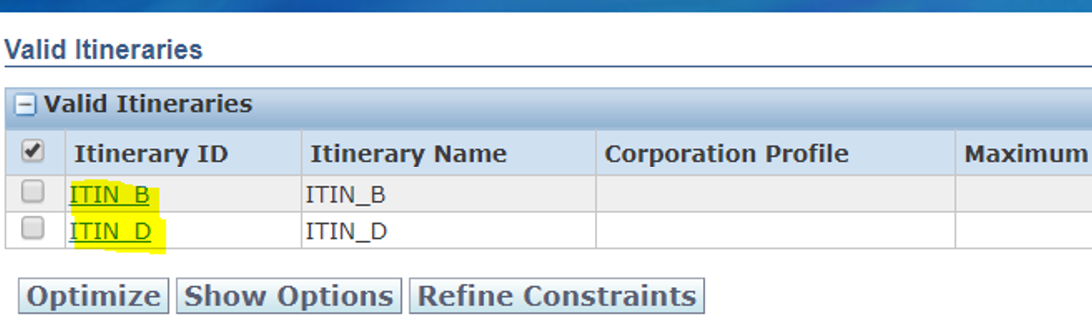
Select both Itineraries and click Show Options to see the cost breakdown for each:
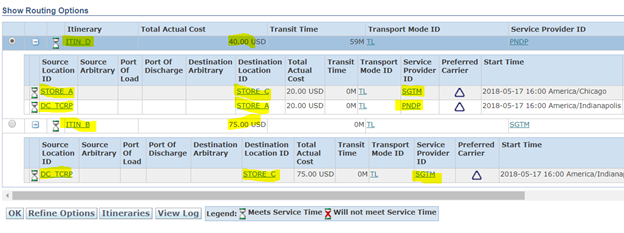
The results confirm our configuration is correct:
- ITIN-B (DC → STORE_C direct): SGTM, 53-FT, $75
- ITIN-D (DC → STORE_A → STORE_C, two legs): Leg 1 PNDP $20 + Leg 2 SGTM $20 = $40 total
When you run Bulk Plan on this Order Release, OTM selects ITIN-D as the least-cost option and creates two Shipments:
- Shipment 1: PNDP, DC → STORE_A, $20
- Shipment 2: SGTM, STORE_A → STORE_C, $20
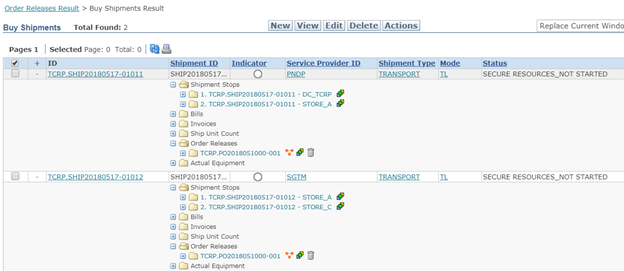
OTM has identified the carrier for each leg. The next step is to notify (tender) those carriers with the pickup dates, times, and location details.