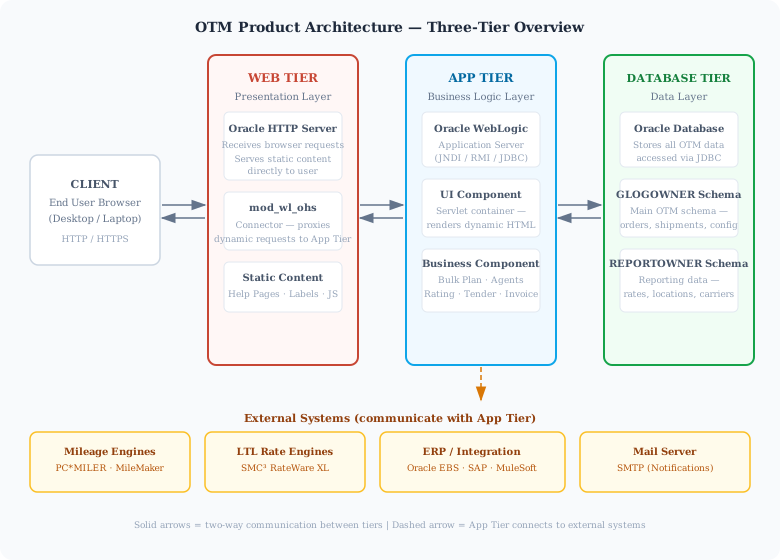
OTM follows a standard three-tier architecture — a widely used design in enterprise software where the application is split into three distinct layers: Web Tier, Application Tier, and Database Tier. Each tier has a specific responsibility, and together they allow OTM to scale, be maintained, and support many users simultaneously.
Depending on the deployment model — on-premise or SaaS — the underlying infrastructure differs, but the three-tier concept remains the same. In on-premise deployments, your organization manages each tier on its own servers. In SaaS (cloud) deployments, Oracle manages the infrastructure and these tiers are hosted and maintained by Oracle.
The Three Tiers:
OTM Product Architecture — Three-Tier Overview:
How Data Flows:
When a user opens OTM in a browser, they are connecting to the Web Tier. Every action the user takes — such as searching for a shipment or running Bulk Plan — sends a request from the browser to the Web Tier. If the request is for static content (like a help page), the Web Tier (OHS) responds directly. If the request requires business processing, OHS proxies it to the Application Tier via the mod_wl_ohs connector. The UI Component receives the request and passes it to the Business Component for processing. The Business Component executes the required logic (sometimes reading or writing to the Database Tier via JDBC) and returns the result back through the UI Component and Web Tier to the user’s browser.
Server Setup:
Each of the three tiers can be deployed on separate servers or combined on a single server, depending on the environment:
External Systems:
The Application Tier can be configured to communicate with external systems that extend OTM’s capabilities:
- Mileage Engines (e.g. PC*MILER, MileMaker) — for calculating distances between locations
- LTL Rate Engines (e.g. SMC³ RateWare XL) — for dynamically fetching carrier rates
- ERP Systems (e.g. Oracle E-Business Suite, SAP) — for exchanging orders and cost data
- Middleware / Integration Platforms (e.g. MuleSoft, Oracle BPEL) — for translating OTM XML to carrier EDI formats and vice versa
- SMTP Mail Server — for sending email notifications from OTM Agents
What’s Next:
Before diving into OTM configuration topics, it helps to be familiar with common logistics terms you will encounter throughout the product — such as Bill of Lading, LTL, TL, 3PL, Incoterms, and more. These terms are used throughout OTM screens, documentation, and day-to-day consulting work.
Next Topic: Basic Logistics Terminology