OTM organises all of its data using a domain model. Understanding domains, the database schema, and how business objects are identified is foundational for anyone working with OTM data — whether you are building integrations, writing reports, or troubleshooting transactions.
Domains:
DOMAIN_NAME column that ties each row to its domain. This is how OTM isolates data between business units within a single database instance.GID and XID — How OTM Identifies Business Objects:
Every OTM business object has two identifier columns:
DOMAIN_NAME.XID. For example, a purchase order in domain ABC with PO number 12345 has ORDER_BASE_GID = ABC.12345. GID is the primary key used in foreign key relationships across tables.12345 part, without the domain prefix. This is what business users recognise. In most implementations, the XID matches the source system's reference number.Standard OTM Database Schemas:
ORDER_BASE), Order Releases (ORDER_RELEASE), Shipments (SHIPMENT), Locations (LOCATION), Rates, Invoices, and more.OTM Data Dictionary:
The Data Dictionary is built into OTM and documents every table and column in the GLOGOWNER schema — including primary keys, foreign keys, and field descriptions. To access it, add html/data_dict to your OTM URL after GC3:
https://<your-otm-host>/GC3/html/data_dict/
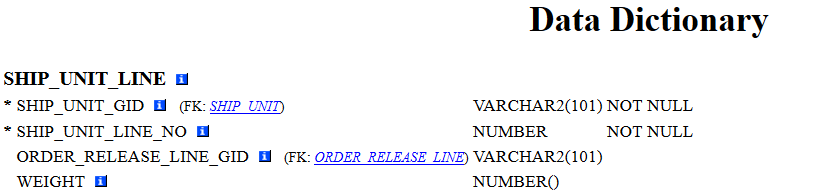
* are part of the primary key. The value in brackets next to a column shows the foreign key reference — for example, SHIP_UNIT_LINE.SHIP_UNIT_GID references SHIP_UNIT.SHIP_UNIT_GID.What’s Next:
The next topic covers the Order Management Data Structure — how OTM organises purchase orders and order releases in the database, and how they relate to shipments.
Next Topic: Order Management Data Structure