Agent Event Restrictions give you control over which types of transactions trigger an agent, and optionally allow you to validate inbound XML transactions before they are committed to the database.
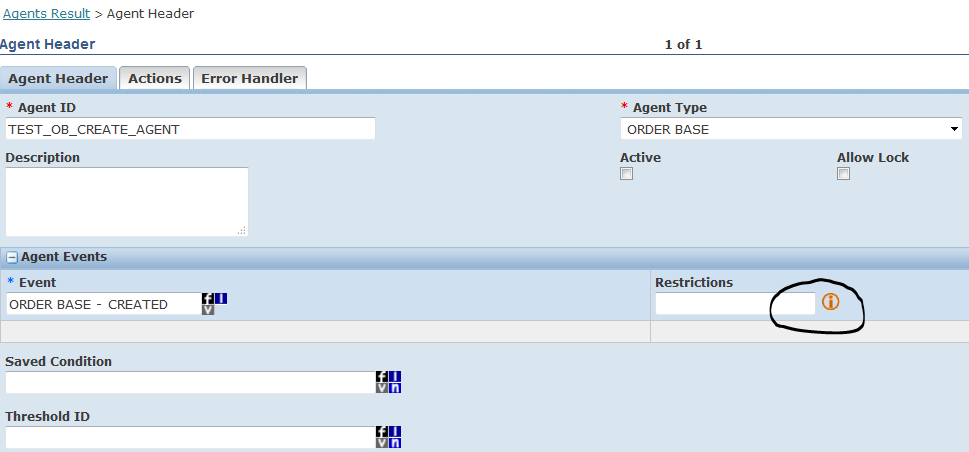
Access this by clicking the “i” icon on the agent header screen:
The Event Restrictions panel appears:
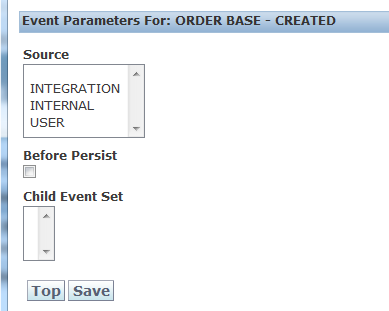
Source Options:
INTEGRATION: Triggers the agent only when the business object (e.g., Order Release) is created by an inbound GlogXML transmission from an external system. Use this when you want agent logic to run only for XML-uploaded transactions.
INTERNAL: Triggers the agent only when the business object is created by a standard OTM internal action, such as "RELEASE ORDER BASE". Use this when the agent should respond to system-generated events, not user or integration activity.
USER: Triggers the agent only when the business object is manually entered by a user within the OTM application.
Tip: You can select multiple sources at once — hold Ctrl and click each source you want. Most users miss this and assume only one source can be selected at a time. If your agent should fire regardless of how the record was created, select all three sources.
Before Persist: